
For 8 hours a day I cosplay as a network engineer. I do not want to play sysadmin in my spare time. This mantra has shaped my (lack of a) homelab for many years now. Don't get me wrong: I very much enjoy tinkering in my free time, but keeping a petting zoo of penguins up to date is not what I consider "fun." Yet, I needed a reliable, low-maintenance and geo-redundant backup solution.
Let's start with an analysis of what I even want to achieve with my backups. I don't need particularly much space; I mostly want to back-up important documents/emails and some of the pictures I took on my phone over the years. The threats I am worried about are disk failures and physical destruction (house fires). I don't need continuous availability in the form of an always-online NFS mount.
The cloud is just someone else's computer, an old saying goes. I want to fully own my backups and not be subject to the whims of some cloud provider hiking their prices or even terminating my account. This comes with a caveat, though: Even though I don't plan on becoming a cyber criminal at this time, the police has a much easier time seizing a box in my home than they have with getting access to a cloud provider in a far away jurisdiction. Burglaries are very similar in this regard, only that you have zero guarantees that the drives don't end up in the hands of actual criminals. Hence, some form of disk encryption is probably not a bad idea.
You don't have backups until you successfully restored from them, is another ancient wisdom. I'm kind of punting on this one: I don't really intend to pull out a complete system ever; just to look up certain files when I need them. For example I already archive emails in mbox or maildir format, allowing me to access them using mutt(1). The necessary configuration is then stored right next to each mailbox archive.
Here are the constraints I've set and features I wanted to hit:
I also wanted the whole thing to have the look and feel of an appliance instead of a Raspberry Pi octopus held together by liberal amounts of gaffer tape. This is not just for aesthetical reasons: The device will live in a storage closet, and rummaging around next to it shouldn't risk the whole thing falling to pieces.
Explicitly a non-goal was any extra features but file storage: many people want not just a NAS, but a media server, container host, DNS filter, surveillance recorder, ... – not something I care about. I also really don't want to use some shoddy vendor-provided firmware that'll stop getting updates after a year or two.
I successfully conned convinced my parents to allow me to set up a secondary unit at their place. They have a great uplink, are many tens of kilometres away from my own flat and have a temperature-controlled and non-easily flooded cellar. A Wireguard tunnel connects the two sites securely. They'll benefit from this deal too, as I can more than spare some disk space for their important stuff.
Mikrotik, a European vendor of network hardware and associated firmware, recently extended their network-gear operating system with features for file servers under the awkward name of RouterOS Enterprise. A RouterOS license for PC hardware is cheap, and due to my day job, I am very familiar with it already. If your only tool is a hammer then every problem looks like a nail, or something like that. One can also expect free-of-charge updates to RouterOS essentially forever.
In my day job, we work a lot with all sorts of Mikrotik hardware. They are extremely good bang-for-buck wise, they offer a wide range of hardware for a lot of use-cases, even are one of a very few European vendors. Crucially, for this here project: They use their proprietary operating system, RouterOS, for all of their offerings. Our BGP routers run the same exact version of software as our Access Points and point-to-point wireless links, as (some of) our switches, as our VPN gateways, as the 15+ year old RB450G routers we still haven't got rid of somehow. And they even sell licenses for PC hardware for a modest price.
That is not to say that I don't have my gripes with them: For one, they base their operating system on a lot of Free Software, but are awful at GPL compliance, if not outright violators. Mikrotik also have a (deservedly) reputation for their sometimes less than stable software and their strange priorities, providing obscure features on one hand and missing basic stuff on the other. The current RouterOS iteration, v7, is also very much still in development, with no long-term support releases in sight.
The aforementioned RouterOS Enterprise, or ROSE-storage, is still relatively new: It first appeared in RouterOS 7.8 from February 2023. While at this point I don't consider this bleeding edge any more, it still counts as cutting edge in my books, and is a bit of a wrinkle in my plan. They did come out with a beefy Data Server for it in February 2025 (just two months ago, at the time of writing), so at least I expect it won't be deprecated any time soon.
Annoyingly, Mikrotik decided to disallow firmware upgrades when using the free L1 license with rOS7.8, so there is no good way around purchasing a L4 license any more.
A positive is Mikrotik's handling of updates: Mikrotik keeps supporting their hardware essentially indefinitely, and even major version upgrades can be installed without extra charge or licensing fees. Firmware and supplemental packages are supplied as Side note on Mikrotik
.npk files; with old versions downloadable from their servers essentially forever. Even if they were to be removed at some point, a copy can be easily kept and installed manually; simply place it in the root file system and reboot.
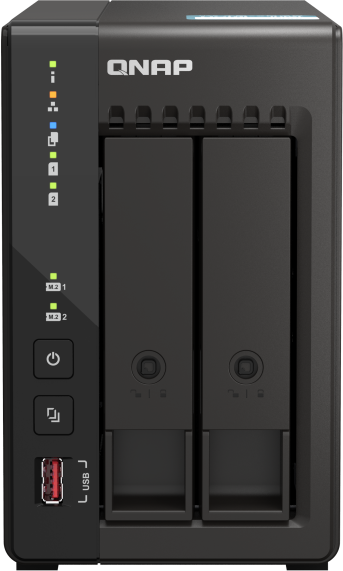
With the software side mostly sorted out, I needed an x86_64 based system and a case to stuff everything into. Not wanting to throw together a system myself and looking for an as small as possible footprint, I quickly turned to the QNAP TS-253E, for mostly pragmatic reasons: While not the cheapest, the brand itself was suggested to me by a friend and that particular model seems adequate. It comes with an Intel Celeron, 8 GB of RAM, and a standard PC BIOS/UEFI.
I still haven't overcome my by now probably no longer justified fear of SSDs for archival, and this chassis provides two hot-swappable 3.5" drive bays, as well as two m.2 slots, one of which I am using to run RouterOS from.
| QNAP TS-253E | 560€ |
| 2x Seagate Ironwolf 4TB | 240€ |
| WD Red SN700 250GB | 65€ |
| RouterOS L4 license | 50€ |
| Total | 915€ |
An off-the-shelf NAS can be had for roughly half the price. However, then you're at the mercy of the vendor when it comes to software updates. I consider the extra cost an investment into my sanity and peace of mind.
RouterOS happily runs from a few hundred Megabytes of disk space, so the choice of SSD is mostly arbitrary. Alternatively, you could also install it to the internal Disk-on-Module.
Installing RouterOS is straight-forward: The TS-253E is pretty much a run-of-the-mill PC compatible system, so just dd(1) the installer image onto a flash drive, hook up to a monitor and keyboard, spam F7 during power-up to enter the boot menu, and follow the on-screen wizard. Make sure to select the optional 'rose-storage' package and the proper disk as installation target. After the installation is complete, enter the BIOS setup from the boot menu:
Let's quickly get the base configuration out of the way, so we can connect to it from SSH:
/system identity set name=nas01
/user set admin password=...
/ip dhcp-client add interface=ether1
At this point I stuffed the device into my closet and reconnected over SSH. As usual, I start by disabling stuff that talks to external hosts and turn off any daemons I don't need. Now is also a good time to enter a license key and set up SSH key authentication.
/system clock set time-zone-autodetect=no time-zone-name=Europe/Vienna
/system ntp client set enabled=yes
/ip cloud set update-time=no
/ip ssh set strong-crypto=yes
/ip service disable telnet,ftp,www,api,api-ssl
Finally, time for setting up storage. We are going to set up dm-crypt on each of the physical drives, add both of these to the same btrfs pool in btrfs-raid1 configuration, and create a few subvolumes on top of that to sort stuff by tenant and/or broad category.
/disk add crypted-backend=sata1 slot=crypted1 type=crypted mount-point-template=storage encryption-key=...
/disk add crypted-backend=sata2 slot=crypted2 type=crypted mount-filesystem=no encryption-key=...
/disk format-drive crypted1 file-system=btrfs
/disk btrfs filesystem set 0 label=btraid
/disk btrfs filesystem add-device btraid device=crypted2
/disk btrfs filesystem balance-start btraid data-profile=raid1 metadata-profile=raid1 system-profile=raid1

/disk btrfs subvolume add name=backups fs=btraid
/disk btrfs subvolume add name=documents fs=btraid
/disk btrfs subvolume add name=snapshots fs=btraid
Because bitrot is a thing, we set up automatic scrubbing and balancing. As per the Mikrotik documentation, the file system should be scrubbed every week and balanced every other. To control which day of the week a task is run on, I set start-date to a random Monday/Wednesday in the past.
/system scheduler add interval=1w name=btrfsScrub on-event="/disk btrfs filesystem scrub-start btraid" start-date=2025-04-02 start-time=03:00:00
/system scheduler add interval=2w name=btrfsBalance on-event="/disk btrfs filesystem balance-start btraid" start-date=2024-04-07 start-time=03:00:00
One annoyance is that the /files menu will quickly become unusable once you begin using the storage. There is a hack that will hide a directory's contents. These entries will then show a type of container store, but it will not affect them in any other way.
echo container > .type
scp .type nas01:/storage/backups
scp .type nas01:/storage/documents
I am not placing such a file into the snapshots volume, as it needs to be traversable by a Mikrotik Script. Each snapshot will inherit a .type file anyhow.
To access the storage I've chosen to use NFSv4. Note that NFS is inherently unauthenticated, so I'm firewalling the relevant port on the NAS to only allow connections from my workstation.
/disk set crypted1 nfs-sharing=yes
/ip firewall address-list add address=workstation.localdomain list=nfsAllow
/ip firewall filter add action=drop chain=input dst-port=2049 protocol=tcp src-address-list=!nfsAllow
I'm only connecting a single client—my workstation. The following configuration makes the file system mountable on-demand:
echo nas01.localdomain:/storage/backups /media/backups nfs noauto,user,rw,nosuid,hard,intr 0 0 >> /etc/fstab
sudo mkdir /media/backups
mount /media/backups
sudo chown $USER: /media/backups
umount /media/backups
To guard against accidental deletions or—god forbid—some kind of ransomware incident, we can set up a script to automatically create read-only daily/weekly/monthly snapshots. These hardly take up any additional disk space, as they make use of btrfs' copy-on-write feature.
/system script add name=functionCreateSnapshots
/system script edit functionCreateSnapshots source

  :local date [/system clock get date]
  /file add type=directory name="storage/snapshots/$tier/$date"
  :foreach entry in=[/disk btrfs subvolume find where !default fullname!="snapshots" snapshot=no] do={
    :local name [/disk btrfs subvolume get $entry name]
    /disk btrfs subvolume add read-only=yes parent=$entry fs=btraid name="snapshots/$tier/$date/$name"
  }

/system scheduler add name=snapshotDaily interval=1d start-date=2025-04-01 start-time=04:00:00 on-event="[:parse [/system script get functionCreateSnapshots source]] tier=daily"
/system scheduler add name=snapshotWeekly interval=1w start-date=2025-04-04 start-time=04:00:00 on-event="[:parse [/system script get functionCreateSnapshots source]] tier=weekly"
/system scheduler add name=snapshotMonthly interval=1d start-date=2025-04-01 start-time=04:00:00 on-event="if ([:pick [/system clock get date] 8 10] = \"01\") do={[:parse [/system script get functionCreateSnapshots source]] tier=monthly}"
As written, this script assumes the btrfs file system is mounted at storage/, is called btraid, that snapshots are located in the subvolume /snapshots and that it gets called at most once per day per tier. For weekly snapshots to happen on the same day of the week every time, we can make use of the start-date trick again; to make monthly snapshots on the 1st of each month we need to check the calendar every day.
This code shows a … quirk of the Mikrotik scripting language: scripts cannot be run with arguments directly. So we never run the script at all, and just use it as a convenient location to store text (retrieved with /system script get $name) that is then eval'd ([:parse $code]) with parameters that get turned into local variables inside the function body.
While at this point functional, this will accumulate lots of snapshots over time. This is not really a problem space-wise, but it does get cluttered after a while. So we can implement a simple mechanism to clean up snapshots when they become too old.
/system/script add name=scriptPurgeSnapshots
/system/script edit scriptPurgeSnapshots source

  :local purgeSnapshots do={
    :local snapshots ({}); # parent dirs of snapshots (named "$tier/$date/")
    :foreach snap in=[/disk btrfs subvolume find top-level=snapshots path~"^$tier"] do={
      :set ($snapshots->[/disk btrfs subvolume get $snap path]) 1; # value does not matter
    };

    :foreach snappath,x in=[:pick $snapshots 0 ([:len $snapshots]-$keep)] do={
      /disk btrfs subvolume remove [/disk btrfs subvolume find path=$snappath]
      :if ([:len [/file find name~"^storage/snapshots/$snappath"]] = 0) do={
        /file remove "storage/snapshots/$snappath"
      }
    }
  }

  :foreach tier,keep in={"daily"=14;"weekly"=5;"monthly"=6} do={
    $purgeSnapshots tier=$tier keep=$keep
  }

/system scheduler add name=snapshotCleanup interval=1d start-date=2025-04-01 start-time=06:00:00 on-event="scriptPurgeSnapshots"
The script relies on the fact that array keys are guaranteed to be sorted and that our snapshot directories are in ISO8601 date format. So when we insert the parent directories of the snapshot (in the form $tier/YYYY-MM-DD/), taking all but the last n elements will return the oldest automagically. This cleanup task can be run as often as we want, as it will always the keep the n newest snapshots and won't accidentally delete them if run twice.
RouterOS/ROSE offers two completely different ways to achieve off-site backups: on the file level, using rsync, and on the filesystem level, using btrfs snapshot transfers. While I eventually settled on using rsync, both ways have their pros and cons, so this article will also briefly touch on btrfs transfers.
For some context, I will briefly describe my setup: As already briefly mentioned, the two sites are connected through a Wireguard tunnel. This is again—how else?—handled by two Mikrotiks: on my end, a RouterBoard already was the primary router; at my parent's I installed a spare one as a VPN gateway.
I'm treating the Wireguard transit network as a DMZ. Hence, for any traffic to get from one LAN to the other requires an explicit firewall rule. Relevant in this context are the ones for Mikrotik's rsync-over-IPsec gadget that's used to mirror drive contents from the primary to the secondary location, and/or SSH for btrfs' send/receive mechanism used to transfer snapshots.
The Mikrotik RSync implementation is a bit unusual: It first opens a 'control connection' (internally implemented using the winbox service), uses it to set up an IPsec tunnel, and only speaks rsync then and there.

The passive end therefore needs to allow connections on tcp/8291, udp/500 and ip/esp. The principle of least privilege requires us to create a seperate user for rsync. Sadly, it needs quite broad privileges: winbox, read and write to configure IPsec, and ftp for file transfer.
/user group add name=sync policy=ftp,read,write,winbox
/user add name=rsync group=sync password=...
My usecase requires synchronizing each subvolume on its own, as some are primarily located on one node and some on the other. Each subvolume can then be pushed to the secondary location separately. If one NAS is master for all subvolumes, and the other replica of all, a single configuration suffices. Note that both local-path and remote-path should end in /, otherwise an additional subdirectory will be created on the receiving end.
# on nas01:
/file sync add remote-address=nas02.localdomain mode=upload local-path=storage/backups/ remote-path=storage/backups/ user=rsync password=...
/file sync add remote-address=nas02.localdomain mode=upload local-path=storage/documents/ remote-path=storage/documents/ user=rsync password=...

# on nas02:
/file sync add remote-address=nas01.localdomain mode=upload local-path=storage/photos/ remote-path=storage/photos/ user=rsync password=...
Once set up, synchronization happens automatically and issuing /file sync print should tell you whether the replicas are up to date.
Transferring btrfs snapshots works a bit differently; it connects to the remote end over SSH. This should also work with a non-RouterOS destination, as it builds on the regular btrfs tools to do its job.

The actual implementation is left as an exercise for the reader. Course material is available online :^)
Having used this system for little under a year now I can definitely say that I'm happy with it. Once configured, the system is very hands-off (it is, dare I say, essentially maintenance-free; it just runs, and runs, and runs). And configuring it did not take long at all (given an existing familiarity with RouterOS): Having started to write this guide while setting up the first device, the second was completely done within half an hour of opening all the boxes.